SoundRave · ATROPA v1.0.0 · User manual
ATROPA

The complete operating reference for the four-layer virtual-analog synthesizer, direct modulation system, preset library, launch effects, Premium access, and companion ATROPA FX plug-in.

4 layers2 oscillators / layer16 Matrix slots16 launch EFX32 voices maximum

Scope of this edition. This manual documents the public v1.0.0 catalog: 13 Included EFX plus three Premium EFX (Granular, Tape Delay, and SingleBand Comp). It does not describe unreleased product content.

1. Start here

ATROPA keeps a complete synthesizer surface visible while giving every layer its own signal path. Start with a factory preset, then move through the signal flow from left to right.

SourcesOSC 1 · OSC 2 · SUB · Noise · Punch
FiltersF1 + F2 · Serial or Parallel
VoiceAmp · Unison · Envelopes · Pan
OutputGlobal Mod · EFX chain · Master
4
Independent layers

Each layer has two oscillators, auxiliary sources, two filters, amplifier, unison and envelopes.

16
Matrix routes

Drag an exposed “+” source to an assignable control, then refine the route in MATRIX.

16
Launch EFX

Thirteen Included processors plus Granular, Tape Delay and SingleBand Comp as Premium.

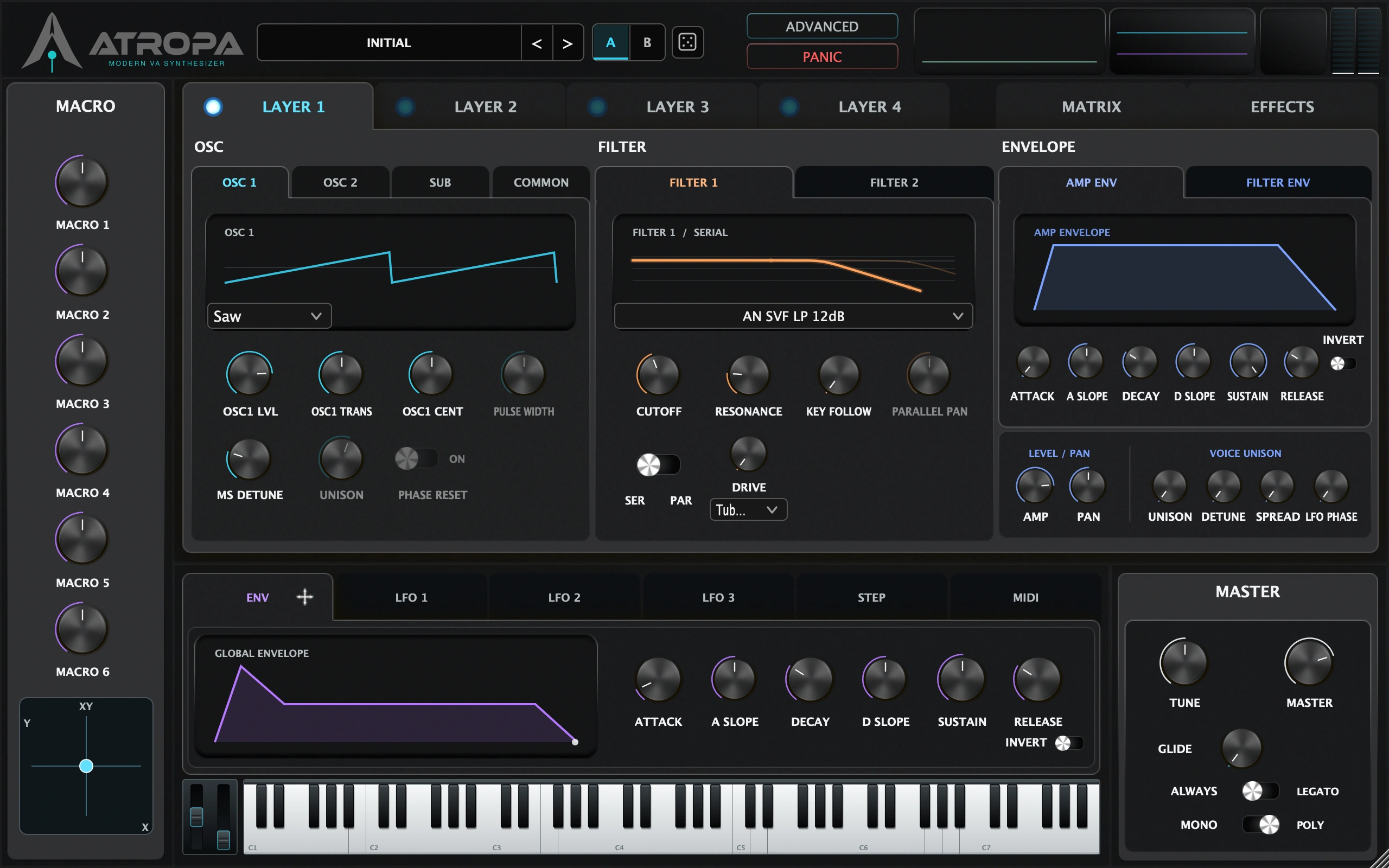
The header provides preset navigation, A/B comparison, Randomize, the account entry, window size, polyphony, quality controls and PANIC. The main page buttons are LAYER 1–4, EFFECTS, ADVANCED, and MATRIX.

2. Install & first launch

System requirements

Minimum requirements for the v1.0.0 release packages
PlatformMinimumFormats
macOS IntelmacOS 10.13 High Sierra or later · 64-bit Intel MacAU, VST3, Standalone
macOS Apple SiliconmacOS 11 Big Sur or later · Apple Silicon MacAU, VST3, Standalone
WindowsWindows 10 64-bit or later · Intel/AMD 64-bit CPUVST3, Standalone

Use a current 64-bit AU or VST3 host. AAX is not part of the v1.0.0 distribution. The installer packages are separate for ATROPA Synth and ATROPA FX.

Install locations

PlatformAUVST3
macOS/Library/Audio/Plug-Ins/Components/ATROPA.component/Library/Audio/Plug-Ins/VST3/ATROPA.vst3
WindowsNot providedC:\Program Files\Common Files\VST3\ATROPA.vst3

First launch checklist

  1. Install the package for your OS and restart the host if it was open during installation.
  2. Create a new instrument track and choose ATROPA. For an effect-only track, choose ATROPA FX when your Premium subscription is active.
  3. Play a MIDI note. Layer 1 is enabled by default; the other layers start silent.
  4. Click the current preset name and load a Factory preset. If the host does not scan the plug-in, run its plug-in rescan.
  5. Set the host buffer before designing: 128–256 samples is a useful starting point, then raise it for large unison/EFX patches.
Standalone. The release build includes a standalone application on macOS and Windows. It uses the same DSP and preset files as the plug-in formats and is useful for testing MIDI/audio routing before opening a DAW.

3. Interface & gestures

Pages and layer tabs

  • LAYER 1–4: choose which layer’s OSC, Filter, Amp and envelope controls are edited.
  • EFFECTS: open the modular rack and the selected effect’s controls.
  • ADVANCED: open render quality, sampler pitch and analyzer settings.
  • MATRIX: view and edit the 16 modulation routes.
  • OSC 1 / OSC 2 / SUB / COMMON: switch the source subsection within the selected layer.
  • FILTER 1 / FILTER 2: switch filter controls; the selected filter’s graph follows.
  • AMP ENV / FILTER ENV: edit the selected layer’s envelopes.
  • ENV / LFO 1–3 / STEP / MIDI: switch the global modulation subsection.

Common gestures

GestureResult
Drag a knobChange the value. The popup shows the formatted unit (Hz, ms, %, dB, st or ct).
Scroll over a knobFine-adjust the value without opening a separate editor.
Double-click a knobReset to that parameter’s default. Filter Envelope DEPTH resets to its neutral 0% position.
Click a switch or selectorChoose the labeled state. Short finite selectors use a compact stepped control.
Double-click a Macro labelRename the Macro. Names are printable ASCII and limited to 18 characters.
Right-click an EFX cardOpen the bypass/remove actions.
Drag an EFX cardReorder the visible chain.
Double-click the XY padReturn X and Y to center (50% / 50%).

Window size and panic

WINDOW SIZE offers 80%, 100% and 125%. This is an editor preference and does not dirty a preset or DAW session. PANIC sends internal All Notes Off / All Sound Off behavior, releases the on-screen keyboard, centers the pitch wheel and clears stuck voice state.

ATROPA main interface showing the synth surface
ATROPA main editor · the full synth surface remains visible in v1.0.0.

4. Presets

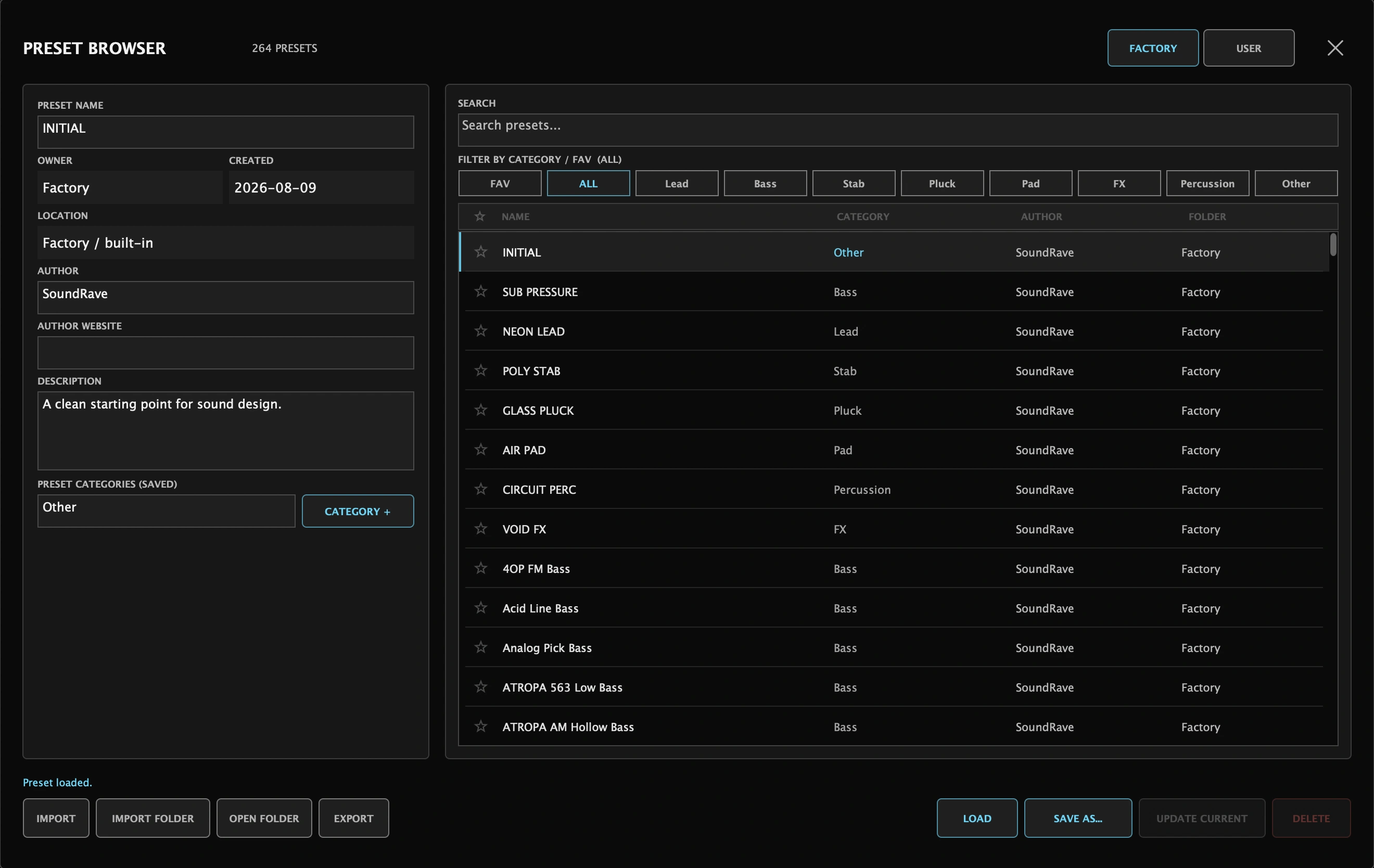
Click the current preset name to open the browser. The header also provides previous/next preset buttons, A/B comparison and a dice button for controlled randomization.

Factory

The Factory tab contains 256 full-format presets plus eight built-in starter presets, for 264 Factory presets total. Categories are Lead, Bass, Stab, Pluck, Pad, FX, Percussion and Other. Factory content is read-only.

User

User presets are UTF-8 JSON files with the .atropapreset extension. The library is scanned under ~/Documents/ATROPA on macOS and the user’s Documents/ATROPA folder on Windows. Subfolders act as banks.

Browser actions

ControlUse
FACTORY / USERSwitch libraries.
FAVShow only starred presets.
SearchFilter the current library by name and metadata.
Category filtersFilter by one or more of the eight canonical categories; multiple categories use OR matching.
LOADLoad the selected preset.
SAVE AS…Write the current sound as a new User preset.
UPDATE CURRENTOverwrite the loaded User preset after confirmation.
IMPORTImport one .atropapreset file; imported files become User-owned.
IMPORT FOLDERRecursively import a folder and preserve its subfolder structure.
EXPORTExport the selected preset.
DELETEMove a User preset to the system trash after confirmation. Factory presets cannot be deleted.
OPEN FOLDERReveal the selected User folder or the library root.
RELOADRescan the User library after files changed outside ATROPA.

A/B and Randomize

A and B are comparison slots. ATROPA captures the current slot before switching, so you can compare two sound states without saving first. The dice button randomizes the selected layer and global modulation only; layer enable state, pan, filter parallel pan, Matrix assignments and the EFX chain are preserved.

WAV safety. A preset can reference a WAV used by WT or SAMPLER. Portable paths under your home/Documents folders are represented with tokens. For safety, importing a community preset removes external and network WAV references; load the WAV again with LOAD WAV if needed.
ATROPA preset browser with Factory and User tabs
Preset Browser · Factory/User libraries, metadata, categories and file actions.

5. Layers & voice architecture

ATROPA has four independent layers. Layer 1 is enabled on a new instance; Layers 2–4 are available but start at 0 oscillator level. Click the layer tab to edit it and its LED to enable/disable its audio path.

Layer controlRangeFunction
Layer Level0–100%Balances the complete layer.
Amp0–100%Layer amplifier level.
Pan100% L – C – 100% RLayer stereo position.
Amp Unison1–8 voicesDuplicates the layer’s amplifier voice.
Detune0–100 ctDetunes Amp Unison voices.
Pan Spread0–100%Spreads Amp Unison voices symmetrically.
LFO Phase0–100%Offsets the LFO phase of Amp Unison voices.
Velocity Sens0–100%Controls how much velocity changes layer level.

Global voice controls

POLY selects 8, 16, 24 or 32 maximum voices. MONO switches to monophonic operation. NOTE PRIORITY is Newest, Oldest, Highest or Lowest. PITCH BEND RANGE is 1–24 semitones. GLIDE TIME is 0–2 seconds and GLIDE MODE is Always or Legato.

Copy a layer

Right-click a layer tab or enable LED, choose COPY TO, then choose the destination layer. Synthesis parameters and oscillator WAV assignments are copied; the destination’s layer enable state is not changed.

6. Oscillators & sound sources

OSC 1 and OSC 2

Each layer has two main oscillators. Choose Sine, Triangle, Saw, Square, Pulse, MultiSaw, WT or SAMPLER.

ControlRange / choicesNotes
Level0–100%Oscillator contribution to the selected layer.
Transpose−24…+24 stSemitone offset.
Cent−100…+100 ctFine tuning.
Pulse Width1–99% audible rangeActive for Pulse; the UI parameter is normalized 0–100% and the DSP clamps the duty cycle away from singular endpoints.
OSC SYNCOff / OnHard-sync behavior for OSC 2 from OSC 1.

MultiSaw

Unison is 1–8 saw voices, DETUNE spreads them by 0–100 cents, and PHASE RESET chooses whether voices restart together at note-on or continue their phases.

WT and SAMPLER

Choose WT or SAMPLER and click LOAD WAV. AUTO PITCH analyzes a stable source pitch and writes the detected root note; the root can be edited from MIDI note 0–127 with fractional cents.

WT playback is always cyclic. SAMPLER offers ONE SHOT or LOOP. In ADVANCED → SAMPLER PITCH, RESAMPLE changes duration with pitch, while FIXED LENGTH keeps source duration and loop period while shifting pitch through overlap-add playback.

SUB, Noise and Punch

SUB offers Sine, Square, Saw and OSC1 Same, with ±24 semitones and independent level. Noise is White or Pink with independent level. Punch is a short transient source with independent Level and 0.5–20 ms Decay.

FM, AM and sync

FunctionChoices / range
FM RouteOff · OSC1 > OSC2 · OSC2 > OSC1
FM TypePHASE keeps the carrier frequency stable and changes render phase; EXP is exponential frequency modulation.
FM Amount0–100%
AM RouteOff · OSC1 > OSC2 · OSC2 > OSC1
AM Amount0–100%

7. Dual filters

Every layer has Filter 1 and Filter 2. Set ROUTE to SERIAL (F1 → cascade drive → F2) or PARALLEL (the source is split into F1/F2). Parallel Pan is active only in Parallel mode.

Core controls

ControlRange / choices
Cutoff20 Hz–20 kHz
Resonance0–100%
Key Follow0–100%
Drive0–100%
Parallel Pan100% L – C – 100% R; Parallel routing only
CF SYNCLinks cutoff movement by preserving the current F1/F2 offset. Moving F2 establishes a new offset.

Analog

Family: SVF, OTA or Ladder.

SVF / OTA: LP, HP, BP, Notch, Peak.

Ladder: AP, M-LPF, K-LPF, J-LPF, Acid.

Slope: −6, −12, −18 or −24 dB where supported by the selected topology.

Digital

Family: D-SVF or D-Special.

D-SVF: LP, HP, BP, Notch, Peak.

D-Special: D-AP, Comb, Buzz LP/BP/HP, Formant, German LP, 563xx LPF/BPF/HPF.

Special models can use topology-specific slope behavior.

Formant and cascade drive

When a Formant model is selected, VOWEL morphs the vowel response and LOW BOOST restores low-frequency weight. In Serial mode, cascade drive offers 15 algorithms: Tube Sat, Diode Clip, Ge Clip, Fold Si, Fold Schottky, Fold Ge, Tape Sat, Crunch, Soft Clip, Hard Clip, Sine Fold, Tri Fold, Saw Fold, Bit Crush and Decimator.

ATROPA dual filter controls and filter selector
Dual filter page · topology, routing, cutoff link and cascade drive.

8. Envelopes

Envelope time knobs use a musical, non-linear mapping rather than a raw 0–1 display. Positive and negative slope values reshape the curve without changing the endpoints.

AMP ENV (Env 1)

The selected layer’s amplifier envelope has ATTACK, DECAY, SUSTAIN, RELEASE, independent A SLOPE and D SLOPE, and INVERT. Layer ranges are Attack 0–5 s, Decay 5 ms–5 s, Sustain 0–100% and Release 2 ms–12 s.

FILTER ENV (Env 2)

Filter ENV has the same ADSR and slope controls, a bipolar DEPTH (−100…+100%) and an F1/F2 target switch. Double-click DEPTH returns to neutral 0%. Its depth is applied to the selected filter cutoff.

Global ENV

The global ENV tab has Attack, Attack Slope, Decay, Decay Slope, Sustain, Release, Depth, Target and Invert. It is a modulation source for synthesis and EFX targets; its release mapping is approximately 10 ms–10 s.

ATROPA global envelope modulation controls
Global ENV · slope shaping, inversion, depth and target.

9. Modulation

LFO 1–3

Each global LFO offers Sine, Triangle, Saw, Ramp, Square, Pulse, S&H and Rand. Select an LFO with the LFO selector, then set:

ControlRange / choices
Rate0.01–30 Hz when free-running
Depth0–100%
Pulse Width5–95%
Start PhaseRand or 0–359°
Fade In0–10 s
Run ModeNote Sync · DAW Sync · Free Run
DivisionTempo division when synchronized
TargetAny supported synthesis or EFX destination

Macros and XY

Six Macros and the XY X/Y pad are modulation sources. Rename Macro labels by double-clicking; names travel with the patch state. Macro values are 0–100% and are available to Matrix routes.

StepGate

The global STEP source is an 8- or 16-step modulation generator. Set Run Mode to Free Run, DAW Sync or Note Sync; Free Rate is 0.05–30 Hz; Gate is 0–100%; Multiplier is x0.5, x1 or x2; each step is 0–127; TIE joins a step to the next. 12 TONE quantizes the output to 12-TET without rewriting the stored step values.

ATROPA LFO controls
LFO page · waveform, rate, depth, phase, sync and target.
ATROPA StepGate controls
STEP page · 8/16 steps, ties, gate, multiplier and 12-Tone mode.

10. Modulation Matrix

MATRIX contains 16 slots. Each slot stores Source, Target, bipolar Amount, Bipolar mode, Layer scope and Mute state. Routes are part of the patch and DAW session state.

Fast assignment

Drag an exposed + SOURCE button onto an assignable parameter. The v1.0.0 drag shelf exposes LFO 1–3, Env 1–3, Velocity, Aftertouch, Mod Wheel, MIDI CC 1–4 and StepGate. The Matrix source menu also includes Macros, XY X/Y, Note and Env Follower.

Editing a slot

FieldFunction
SourceSelect the modulation source or Off.
TargetSelect a synthesis, envelope or launch EFX destination.
Amount−100% to +100%; the sign sets direction.
BipolarUse bipolar source behavior when enabled.
LayerGlobal, L1, L2, L3 or L4.
MUTETemporarily disable a route without clearing it.
CLEARClear Source, Target and Mute for that slot.
Debugging a route. If a control is moving unexpectedly, open MATRIX, mute slots one at a time, and watch the target. Mute preserves the route so it can be restored without reassigning it.
ATROPA MIDI modulation assignments
MIDI page · direct performance sources and assignable CC lanes.

11. Effects chain

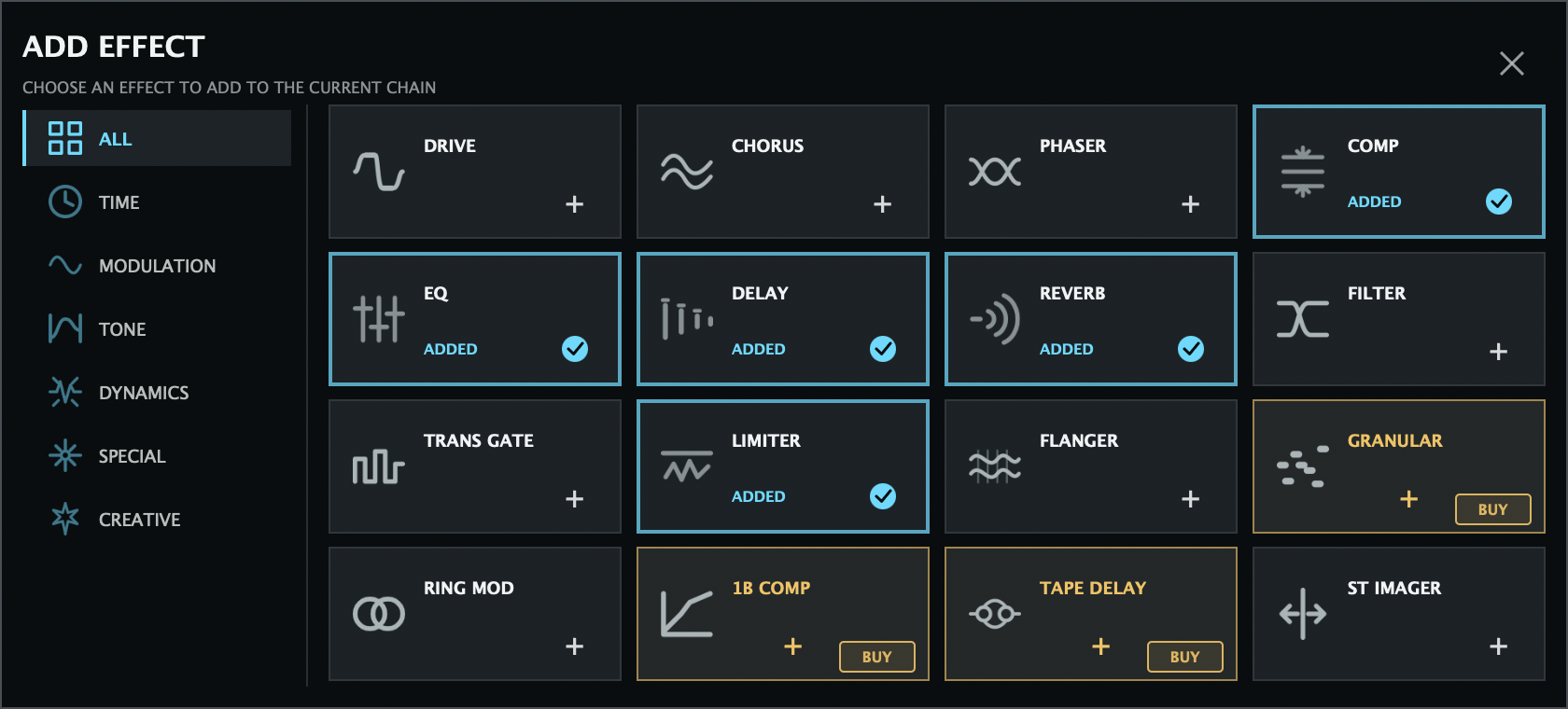
Open EFFECTS to build a modular rack. Click + ADD EFX to add a launch processor, click a card to edit it, use ON/OFF to bypass it, X to remove it, and drag cards horizontally to reorder. The global ALL EFX switch bypasses the whole chain while preserving each module’s individual ON state.

At v1.0.0, the public rack contains 13 Included processors and three Premium processors. Premium processors show their access state and can be previewed when eligible.

Drive

Saturation, clipping, folding and degradation.

Controls: Amount · Type (15 algorithms) · Mix · Output

Chorus

Three chorus characters with variants and tempo sync.

Choices: J-Chorus · D-Chorus · E-Chorus; I/1 · II/2 · I+II/3 · D Mode 4
Controls: Rate 0.1–5 Hz · Depth · Mix · Sync/Division

Phaser

Modulated phase filtering with stereo spread.

Controls: Speed 0.05–12 Hz · Mix · Spread · Intensity · Script/Block · Sync/Division

Comp

Three-band upward/downward dynamics processor.

Controls: Depth · Time (0.25–4x) · Upward · Downward · Ratio 1–20 · per-band Threshold/Makeup · Crossovers · Soft Limiter · Mix

EQ

Three-band parametric equalizer.

Controls: Low/Mid/High Gain ±12 dB · Frequency · Q 0.1–10 · Low/High Bell or Shelf

Delay

Digital or analog-style delay with flexible stereo routing.

Controls: Time 10–2000 ms · Feedback · AN/DG · M/S/PP · Width · PP Start L/R · Mod Rate/Depth · Feedback HPF/LPF · Sync/Division · Mix

Reverb

Plate, Room, Hall and Amb ambience models.

Controls: Type · Decay · Early Reflections · HPF · LPF · Mix

Filter

Effect-stage filter.

Choices: Low Pass · High Pass · Band Pass
Controls: Cutoff 20 Hz–20 kHz · Resonance · Mix

TransGate

Rhythmic 8/16-step amplitude gate.

Controls: Steps 8/16 · Free/DAW/Note · Rate 0.05–30 Hz · Gate · x0.5/x1/x2 · Step 0–127 · Tie · 3-Div subdivision · Mix

Limiter

Final peak control and drive.

Controls: Ceiling −12–0 dB · Drive 0–18 dB

Flanger

Short modulated delay with feedback and stereo offset.

Controls: Rate 0.02–10 Hz · Depth · Delay 0.1–10 ms · Feedback −95…+95% · Stereo · Sync/Division · Mix

Ring Modulator

Frequency-based ring modulation.

Controls: Frequency 0.1–8000 Hz · Stereo · Mix

StImager Included

Stereo width, full-band or split low/high.

Modes: Full · Low / High
Controls: Width · Low Width · High Width (0–200%) · Crossover 40–2000 Hz

Granular Premium

Live circular-buffer granular processing.

Controls: Size 10–500 ms · Density 1–40 Hz · Position 20–2000 ms · Spray · Pitch ±24 st · Feedback −95…+95% · Stereo · Freeze · Mix

Tape Delay Premium

Delay with tape motion, aging and saturation.

Controls: Time 20–2000 ms · Feedback 0–94% · Wow · Flutter · Age · Saturation · Width 0–200% · Sync/Division · Mix

SingleBand Comp Premium

Conventional compressor with VCA/FET responses.

Controls: Type · Threshold −60–0 dB · Ratio 1–20 · Attack 0.05–200 ms · Release 10–2000 ms · Knee 0–24 dB · Makeup −12…+24 dB · Mix

ATROPA Delay effect controls
Example EFX page · routing, sync, modulation and feedback filters.

12. Account & Premium access

The core ATROPA instrument is free. Sign-in is required to sync purchases, refresh entitlements and use verified offline access. Payment details are entered only in the secure SoundRave/Stripe browser pages; the plug-in never stores card information.

v1.0.0 public access options
AccessPriceIncludes
FREE$0ATROPA Synth, 264 Factory presets, User library and 13 Included EFX.
PREMIUM$4.99 / monthAll currently published Premium EFX, ATROPA FX, and new Premium EFX when officially released; price remains while continuously subscribed.
ALL-IN SNAPSHOT$19.99 one-timePermanent ownership of every Premium EFX available at v1.0.0. Future Premium EFX are not automatically included.
Individual EFXFrom $4.99Permanent ownership of one Premium EFX: Granular $9.99, Tape Delay $7.99 or SingleBand Comp $4.99.

Sign in and refresh

  1. Click OPEN ACCOUNT / LICENSE (or the account button) in the ATROPA header.
  2. Enter the email and password for your SoundRave account, then click SIGN IN. CREATE ACCOUNT opens the secure registration page in the default browser.
  3. After a purchase or subscription change, click REFRESH LICENSE. Checkout success pages alone do not unlock an effect; the signed entitlement must be refreshed.
  4. Use BILLING & PLAN for subscription management and SIGN OUT to revoke the local session.

Premium states and 10-minute previews

Premium EFX can show AVAILABLE, OWNED, INCLUDED IN SUBSCRIPTION or LOCKED. A published, unowned Premium EFX can be tried for 10 continuous minutes. When the preview ends, that effect enters a 24-hour cooldown; each effect has its own independent timer. A ready preview starts when the effect is added/enabled. An effect in cooldown can remain in the rack bypassed and can be enabled after the timer ends.

ATROPA FX. The effect-only plug-in is subscription-only. An All-In Snapshot or an individual Synth EFX license does not unlock ATROPA FX; the ATROPA FX editor requires a verified active Premium subscription.

Offline behavior and privacy

  • Access tokens remain in memory only.
  • A refresh token is stored per user in a protected SoundRave/ATROPA application-data file (Windows uses the OS credential store).
  • The offline cache contains only a signed entitlement envelope; the plug-in re-verifies it before granting access.
  • Verified offline access continues until the envelope’s offline validity/grace window ends. Reconnect and use REFRESH LICENSE if access expires.

13. Advanced & quality

SettingChoices / rangeUse
Oversampling1x · 2x · 4xReduces nonlinear aliasing at increased CPU cost.
Waveform QualityEco · Normal · HighOscillator waveform detail and render cost.
BLEP QualityEco · Normal · HighEdge anti-aliasing for sharp oscillator waveforms.
Interpolation QualityEco · Normal · HighSample and wavetable interpolation detail.
Sampler PitchResample · Fixed LengthChoose duration-changing or duration-preserving pitch playback.
Analyzer512 · 1024 · 2048FFT resolution for the analyzer display.
Polyphony8 · 16 · 24 · 32Maximum simultaneous voices.
Note PriorityNewest · Oldest · Highest · LowestNote choice when the voice limit is reached.
CPU strategy. Keep 1x oversampling and Normal quality while designing layered or high-unison patches. Raise oversampling or quality after the sound is complete, and use the host CPU meter to find the balance.

Quality, analyzer resolution and editor window size are preferences rather than musical sound data. They are not included in an exported .atropapreset.

14. MIDI & performance

Direct MIDI assignments

The MIDI page provides a target and bipolar depth for Velocity, Aftertouch and Mod Wheel. Four assignable lanes (CC A–D) add a MIDI CC number 0–127, target and bipolar depth.

ATROPA MIDI page with velocity, aftertouch, mod wheel and CC lanes
MIDI assignments · direct sources plus four configurable CC lanes.

Keyboard and wheels

The on-screen keyboard sends internal note events. The GUI pitch wheel sends the full 14-bit range (0–16383) and returns to center through PANIC. The modulation wheel sends MIDI-style values 0–127.

Master

MASTER controls final output level. TUNE provides ±12 semitones of global tuning adjustment. A host tempo is used by DAW-synchronized LFO, StepGate and tempo-aware EFX divisions.

15. Sessions, automation & files

DAW sessions and automation

Sound parameters, Matrix routes, Macro names, layer state and the EFX rack state are stored in the host session and can be recalled with the plug-in. APVTS parameters support host automation. Editor window size, page selection and render-quality preferences are intentionally separate from sound presets.

User preset format

.atropapreset is UTF-8 pretty-printed JSON. It stores product/format metadata, plain parameter values, categories, Macro names and safe WAV references. Enum values are validated; invalid or out-of-range data is rejected, and unknown parameter IDs are ignored for forward compatibility.

DataSaved with preset/session?
Synthesis, envelopes, Matrix, Macros and EFX valuesYes
Layer enable and rack membershipYes
Macro display namesYes
Editor window sizeNo — preference
Oversampling, waveform/BLEP/interpolation quality and analyzer resolutionNo — preference
Access token or payment dataNever

File limits and portability

Imports accept individual files up to 4 MB and folder batches up to 2048 files. User WAV references under the home/Documents folders are portable; absolute paths outside those locations are omitted on export. Keep shared WAVs in a stable project folder and save the preset again after relinking.

16. Troubleshooting

SymptomCheck
No soundEnable at least one layer LED; check OSC levels, layer Amp, Master level and Amp ENV Sustain/Release; confirm MIDI routing and host monitoring.
Stuck note or wheelClick PANIC. It sends All Notes Off/All Sound Off internally and resets the GUI wheels.
MultiSaw controls unavailableSelect MultiSaw for OSC 1 or OSC 2. Detune is audible only when Unison is above 1.
Pulse Width has no effectSelect Pulse; other waveforms ignore PWM.
FM/AM amount appears inactiveChoose a non-Off FM or AM route first.
Sampler controls unavailableSelect SAMPLER. WT is cyclic and ignores One Shot/Loop.
Filter controls differSome ladder and Digital Special topologies use fixed or topology-specific slopes; this is intentional.
User preset missingOpen USER and click RELOAD. Confirm the file is under Documents/ATROPA and uses the .atropapreset extension.
Effect is silentCheck the module ON/OFF state and ALL EFX. A bypassed card keeps its settings; a removed card is no longer in the rack.
Premium remains lockedSign in, click REFRESH LICENSE, confirm the effect is part of your purchase/subscription, and check whether its 24-hour preview cooldown is active.
ATROPA FX will not openATROPA FX requires a verified active Premium subscription. Snapshot and individual Synth licenses do not satisfy this gate.
High CPUReduce polyphony/unison, use 1x oversampling, select Normal or Eco quality and bypass unused EFX. Raise settings only after the patch is stable.
When reporting an issue. Include OS/version, host/version, plug-in format (AU/VST3/Standalone), sample rate/buffer, whether the issue survives PANIC and whether it reproduces from a new instance with a Factory preset. Never send passwords, refresh tokens or payment details.

17. Quick reference

Global modulation sources

LFO 1–3 · Amp Env · Filter Env · Global Env · Env 4 · Env Follower · Macro 1–6 · XY X/Y · Velocity · Note · Aftertouch · Mod Wheel · MIDI CC 1–4 · StepGate.

Common tempo divisions

4 Whole, 2 Whole, Dotted Whole, Whole, Dotted Half, Half, Dotted Quarter, Quarter, Dotted 8th, 8th, Dotted 16th, 16th, Dotted 32nd, 32nd and Dotted 64th.

Launch Included EFX

Drive · Chorus · Phaser · Comp · EQ · Delay · Reverb · Filter · TransGate · Limiter · Flanger · Ring Modulator · StImager.

Launch Premium EFX

Granular ($9.99) · Tape Delay ($7.99) · SingleBand Comp ($4.99). All-In Snapshot: $19.99 one-time. Premium: $4.99/month.

Keep this page close

For a fast sound-design pass: load a Factory preset, enable a second layer, choose OSC 1/2 waves, set Filter Route and CF SYNC, shape AMP ENV, drag an LFO source to a target, then add and reorder EFX. Save the result with SAVE AS… before experimenting with Randomize.